How we made the DASMA VIP reel: 17 seconds with Claude and Google Flow
· 15 min read
DASMA VIP makes digital wedding invitations. For their Facebook and Instagram ad we needed a vertical video of about 17 seconds: hands, roses and a delighted aunt, but with the real invitation on the phone screen. We made it without a camera, actors or editing software: Claude wrote the plan, Claude in Chrome ran Google Flow for us and Claude Code did the edit. This is the whole process: every prompt, what broke, what it cost and what we would do differently next time.
What the voice says (translated from Albanian)
- „Ende po dërgoni foto të thjeshta për ftesat e dasmës?“ (Still sending plain photos for your wedding invitations?)
- „Krijoni një ftesë dixhitale unike që hapet menjëherë me një link.“ (Create a unique digital invitation that opens instantly with one link.)
- „Të ftuarit konfirmojnë pjesëmarrjen me një klik, dhe ju shihni menjëherë listën e saktë.“ (Guests confirm with one click, and you see the exact list straight away.)
- Format
- 9:16
- vertical, 17.6 seconds
- Made in Flow
- 6 + 2
- shots + voice clips
- Flow credits
- 474
- used, out of 500
- Launch
- 8 Oct
- Thursday, 09:00
The short version
Claude wrote the plan
We asked for a production plan and got back an interactive page with ten steps: Flow settings, a second-by-second edit, every prompt with a copy button, a “keep it if” check for each clip, the file names, the voice script and the finished ad copy.Claude in Chrome ran Google Flow
We opened Flow in Chrome, gave the Claude extension the plan's link and one instruction: do everything up to step 7, then download the files. It made a reference image, six shots and the Albanian voice, fixed what it could, and downloaded everything.It stopped to ask instead of guessing
Twice: once because it can't hear audio (which voice sounds natural?), and once before spending most of the credits we had left.Two parts of the plan broke, and both had a workaround
Flow only generated at 360p or 720p, so the clips were upscaled to 1080p on download. And Flow wouldn't extend the voice clip, so a built-in voice preset (Sulafat) kept one narrator across two separate clips.Claude Code did the edit
It put the real DASMA VIP invitation on the green phone screens, added the captions, the voice and the music, and exported the Messenger ad, the organic reel and the cover. The Flow side cost 474 of our 500 credits.
The brief: an invitation that opens like a letter
DASMA VIP makes digital wedding invitations for couples in Albania (dasma means “the wedding” in Albanian). Instead of a photo of a paper card passed around on WhatsApp, guests get one link. The invitation opens with a burgundy wax seal, then shows a countdown, a map and a music button, and guests confirm with one tap. The couple watches the guest list fill in and plans the seating. Prices start at €29.
We needed a vertical 9:16 ad of about 17 seconds for Facebook and Instagram, built to start conversations in Messenger, plus an organic reel and a post. Everything the viewer hears and reads is in Albanian. Launch: Thursday 8 October, 09:00.
The trick: generate the scene, keep the product real
AI video can't show a real app screen; it invents one. So every phone in the generated shots has a flat chroma-key green screen (#00FF00). Flow makes the real-world scenes (a hand, roses, a delighted aunt), and Claude Code lays recordings of the real invitation onto those green screens, tracked to the movement of the hand.
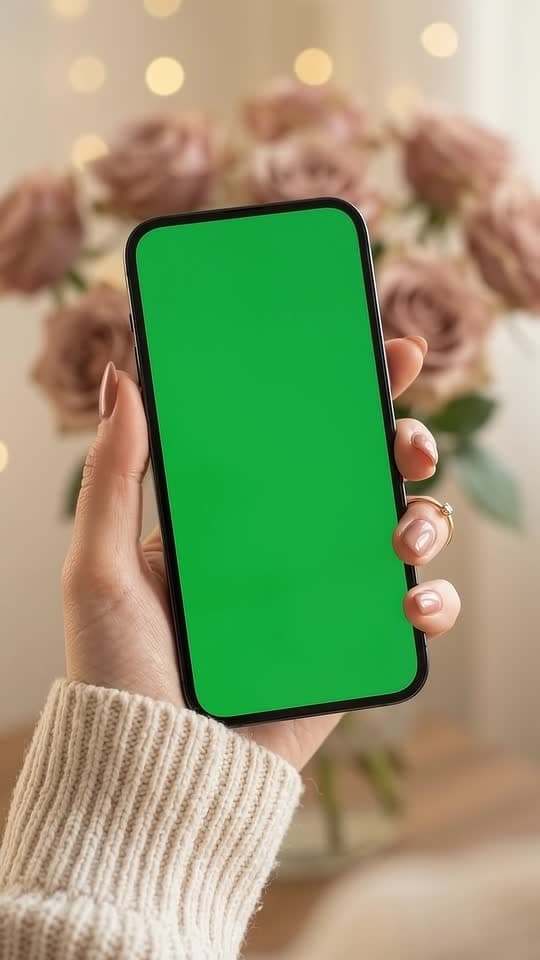 From Flow
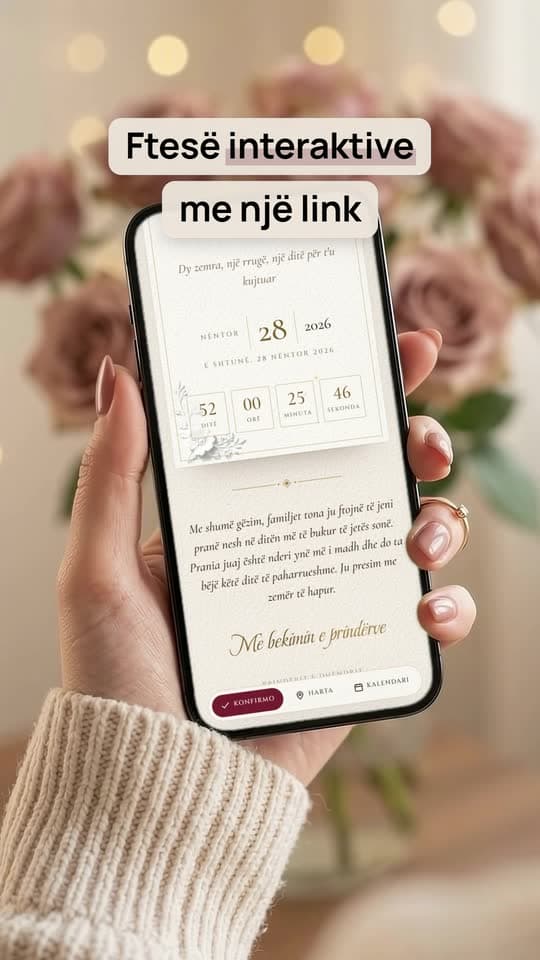 In the reel
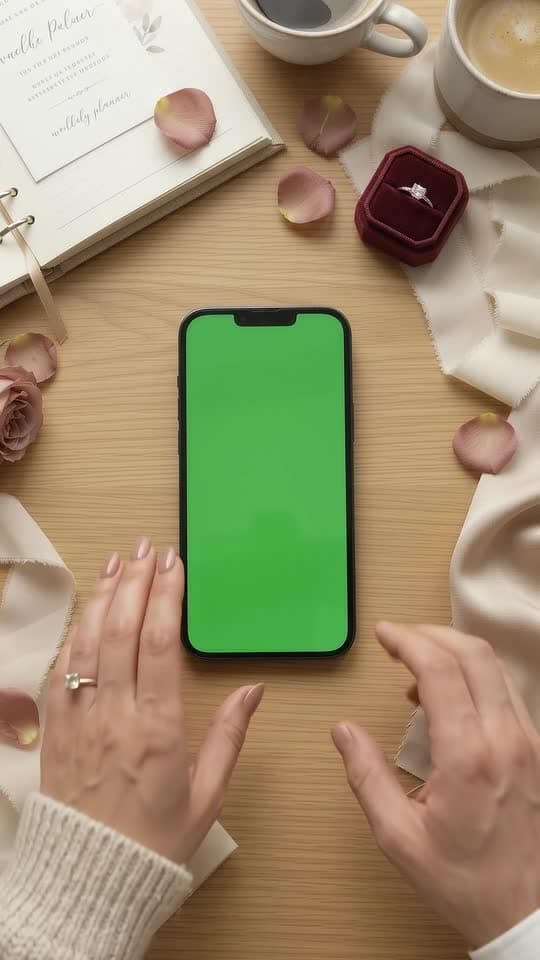 From Flow
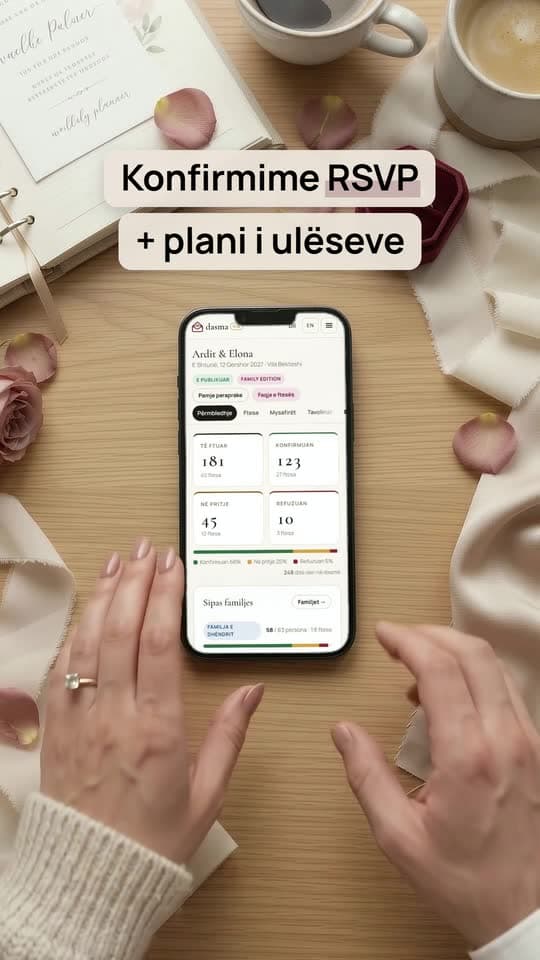 In the reel
The scenes are generated. The product on screen is real.
Who did what
Four stages, three Claude surfaces and one video tool. We stepped in only where a machine shouldn't decide alone: what the voice sounds like, and whether to spend the credits.
01 · Plan
Claude
Writes the plan: the edit, every prompt, the checks and the ad copy.
02 · Generate
Claude in Chrome
Runs Google Flow inside our browser: shots, voice, fixes, downloads.
03 · Collect
Us
We listen to the voices, rename and sort the downloaded files.
04 · Edit
Claude Code
The real invitation on the green screens, the captions, the voice and the music.
What came out
- Messenger ad
- Organic reel
- Cover and copy
1080×1920 MP4 plus a JPG cover.
How the Chrome session went
The real back-and-forth, condensed. Claude here is Claude in Chrome, working inside Flow.
- 01Us
Pasted the plan's link: do everything up to step 7, then download all the files.
- 02Claude
Made the hand reference image, moved the ring with Flow's edit, and started the six shots.
- 03Claude
While the shots rendered, made four voice takes, then paused: it can't hear audio, so which take sounds most natural?
- 04Us
Grab everything, voices included. We'll decide in Claude Code.
- 05Claude
Started 11 downloads and listed every change from the plan: 720p, the ring, shots 1A and 1B, skipped step 5.
- 06Us
They all sound good.
- 07Claude
Tried to extend the first take; Flow refused. Asked how to keep one narrator, recommended Sulafat, and held off: it would cost 60 of 86 credits.
- 08Claude
Confirmed all six shots at 1080p, plus the image and the voice takes, with a rename table.
- 09Us
Go with Sulafat.
- 10Claude
Made all four lines in that voice: two clips, two takes each. 26 credits left.
- 11Us
Took the files to Claude Code for the edit.
What each second shows
The plan started from the finished 17 seconds and worked backwards: four beats, six shots, the voice lines and the captions. The times below are the finished reel's. Shots with a green line have a green phone screen, where the edit puts the real invitation.
green phone screen: the real invitation goes here in the edit
Hook · the old way
0.0–4.0 s- Picture
- 1A: someone photographs a printed card (with the camera's flash). 1B: a thumb taps the phone and the burgundy wax seal opens.
- On-screen text
- „Ende me foto në WhatsApp?“
- Still sending photos on WhatsApp?
- Voice-over
- „Ende po dërgoni foto të thjeshta për ftesat e dasmës?“
- Still sending plain photos for your wedding invitations?
The product · one link
4.0–8.3 s- Picture
- 2: a thumb scrolls the real invitation: the names, the countdown, the venue and the map.
- On-screen text
- „Ftesë interaktive me një link“
- An interactive invitation, one link
- Voice-over
- „Krijoni një ftesë dixhitale unike që hapet menjëherë me një link.“
- Create a unique digital invitation that opens instantly with one link.
The proof · RSVP and the list
8.3–13.4 s- Picture
- 3A: an aunt reads, smiles and taps “yes”; a notification pops up: „Teta Drita konfirmoi ✓“ (Aunt Drita confirmed). 3B: from above, the couple watch confirmations climb from 101 to 129, then the seating tables fill.
- On-screen text
- „Konfirmime RSVP + plani i ulëseve“
- RSVP confirmations + seating plan
- Voice-over
- „Të ftuarit konfirmojnë pjesëmarrjen me një klik, dhe ju shihni menjëherë listën e saktë.“
- Guests confirm with one click, and you see the exact list straight away.
Call to action · message us
13.4–17.6 s- Picture
- 4: the phone on an acrylic stand among roses, the sealed invitation on screen, the DASMA VIP logo.
- On-screen text
- „Ftesë dixhitale“ · „nga 29 €“ · „Na shkruani në DM →“ · dasmavip.com
- Digital invitation · from €29 · Message us →
- Voice-over
- Music only.
- In the Messenger ad: „Na shkruani në Messenger për të parë modelet tona.“ (Message us on Messenger to see our designs.)
The look: one palette, one set of props
- cream
- dusty rose
- champagne
- burgundy
- gold
- Every prompt asks for the same palette, cream, dusty rose and champagne beige with burgundy and gold accents, to match the invitation's wax-seal theme.
- The same props come back: dusty-rose roses, gold rings, and a cream envelope with a plain wax seal (no letters, so no invented logo).
- Every phone is an “unbranded black smartphone”, and nobody on screen speaks: the voice is an off-screen narrator.
- Warm window light and shallow focus everywhere, except shot 1A, which is deliberately flat and dull: the old way.
Ten steps, and what actually happened
Each step has two parts: what the plan said, and what happened when Claude in Chrome ran it inside Flow. Our whole instruction was the plan's link and one line: do everything up to step 7, download all the files after step 6, I'm already in Google Flow.
- Done · changed
Step 1
Set up Flow
A new Flow project called “DASMA – Messenger reel”, with the same settings for every shot:
- Model
- Gemini Omni 1.1 Flash
- Aspect ratio
- 9:16 portrait, checked before every generation
- Testing
- Draft (360p), 2 outputs: about a third of the cost of a 720p render
- Finals
- 1080p, 2–4 outputs (Reels play at 1080×1920, so 4K isn't needed)
- Clip length
- The longest single clip on offer (about 8–10 s); the edit trims it
- Prompt language
- English, with Albanian only inside the quoted voice lines
- Done · fixed
Step 2
Make the hand reference image
Shots 1B, 2 and 3B use one still image as an ingredient (Flow's word for a reference image), so the same hand, ring and phone appear in every shot. Prompt P0 in the appendix, 4 outputs.
Keep it if the hand has five natural fingers, the ring is on the ring finger, and the screen is flat green.
- Done · 1 prompt reworded
Step 3
Generate the six shots
For each shot: a Draft with 2 outputs, a check of the movement and the green screen, then the same prompt as a final with 2–4 outputs. Green-screen shots get 4, because they fail more often. These shots have no voice, only room sound.
- 1ASeconds: 0.0–1.3What it shows: A hand photographs a printed card. Meant to look a bit dull.Made with: Text to video
- 1BSeconds: 1.3–3.2What it shows: A thumb taps once, just below the middle of the screen, where the wax seal will open.Made with: Reference image · green screen
- 2Seconds: 3.2–7.2What it shows: The thumb swipes up twice with a pause; roses behind.Made with: Reference image · green screen
- 3ASeconds: 7.2–9.0What it shows: An Albanian woman in her late 50s reads, smiles and taps; the screen faces away.Made with: Text to video
- 3BSeconds: 9.0–12.2What it shows: Overhead: the phone flat on a table, the couple's hands; she points, they squeeze hands.Made with: Reference image · green screen
- 4Seconds: 12.2–17.0What it shows: The phone on a clear stand among roses, top third left empty for the logo and price.Made with: Text to video · green screen
These are the plan's seconds; the final edit moved them a little.
- Done · another way
Step 4
Generate the voice track
Every Flow generation invents a new voice. To keep one narrator, the plan put lines 1 and 2 in a single clip (V1, 4 outputs), picked the best take, then used Flow's Extend on that clip to add lines 3 and 4 (V2). No Draft here: a voice you like in Draft won't come back in the final.
- Skipped
Step 5 · optional
Backup voice versions
One extra clip per voice line, each spoken over its own shot, to swap in if a line in the main voice track was weak. Each one would be a different woman, so they were only ever meant to replace a single line.
- Done · voice by us
Step 6
Check every clip, fix or redo
The plan had a checklist for each kind of clip:
Picture shots
- Screen flat green edge to edge: no icons, glare, glow or gradient
- All four screen corners visible for the whole clip
- Only a thumb or finger crosses the screen, and only low down
- The phone stays rigid and rectangular, no logo
- Five fingers, and the ring stays on the same finger
- No subtitles, text or logos anywhere
- Slow, smooth movement with no jumps
Voice takes, by ear
- Every word exactly as written, nothing added or dropped
- ë and ç sound Albanian, not a plain “e” or “c”
- A native accent, not Italian or Greek
- No music and no second voice
- The same woman from start to finish
Fix rules. If a picture shot is almost right, use Flow's edit with a one-line instruction instead of generating again (both fix prompts are in the appendix). For a voice clip, make a new one, because editing can change the voice. If a green screen keeps failing after 3–4 tries, a plain black screen works too.
- Done · renamed by us
Step 7
Download and name the files
Download each chosen clip at 1080p into the project folder under fixed names:
ref-hand.jpg,shot1A.mp4toshot4.mp4, andvoice-track.mp4. - Our jobs
Steps 8 and 9
Two jobs for us, outside Flow
Step 8
Record your own voice as a backup
About five minutes, and it means the ad can go out even if Flow's Albanian sounds wrong. Use the phone's voice recorder in a quiet room (a car or a wardrobe full of clothes works), hold the phone about 20 cm away and a little to the side, and read each line three times with a two-second pause. Warm, smiling, no announcer voice. Save it asmy-voice.m4a.Step 9
Get the music
Meta Business Suite, then All tools, then Sound collection, where the tracks are cleared for ads. Search “elegant acoustic wedding” or “romantic piano”: 95–110 bpm, no singing, at least 20 seconds. Download two options asmusic-1.mp3andmusic-2.mp3; the edit mixes the music quietly under the voice. - Done
Step 10
The edit in Claude Code
With the files in the project folder, Claude Code takes over. The brief from the plan:
- record the live burgundy wax-seal invitation: the seal opening, the countdown, the map, the music button and the RSVP
- record the couple's guest list filling in, then the seating plan, using test guests
- track those recordings onto the green phone screens, so each screen moves with the hand
- add the Albanian on-screen text in the brand colours, kept clear of Instagram's buttons, and the DASMA VIP logo on the end card
- mix the voice and the music, then export a 1080×1920 MP4 and a cover image
The files, and the Flow titles we renamed them from
ref-hand.jpgFlow's title: Woman holding green screen smart…What it shows: The hand reference image, ring moved to the ring fingershot1A.mp4Flow's title: Woman photographing wedding invi…What it shows: The back of the phone above a paper cardshot1B.mp4Flow's title: Woman holding smartphoneWhat it shows: A hand holding the phone; the thumb taps onceshot2.mp4Flow's title: Woman scrolling smartphoneWhat it shows: A hand holding the phone, roses behindshot3A.mp4Flow's title: Woman reading smartphone and smi…What it shows: The aunt smiling at her phoneshot3B.mp4Flow's title: Couple planning wedding at tableWhat it shows: Overhead, two hands by the phoneshot4.mp4Flow's title: Smartphone on stand with rosesWhat it shows: Clean green screen, no markers (1080p)- Voice, lines 1–2 (Sulafat, 2 takes)Flow's title: Smartphone displaying green screenWhat it shows: 720p; pick the better take
- Voice, lines 3–4 (Sulafat, 2 takes)Flow's title: Smartphone on display with rosesWhat it shows: 720p; pick the better take
- Not used: first voice takes ×4Flow's title: Smartphone on stand with rosesWhat it shows: 720p, random voice, lines 1–2 only, white cross markers
- Delete: rejected shot 4Flow's title: Smartphone on stand with rosesWhat it shows: 1080p, white cross markers on the screen
What it cost
Our Flow account had 500 credits. The whole job used 474 of them, which left no room for the optional extras.
- ≈414 · image, drafts, six finals, first voice takes
- Sulafat voice · 60
- 26 left
- Backups that didn't fit · ≈120
| Stage | Credits | Balance |
|---|---|---|
| Starting balance | – | 500 |
| Reference image and ring edit, Draft tests, six finals, four V1 voice takes | ≈414 | ≈86 |
| 1080p upscales on download | no change seen | 86 |
| Backup voices (step 5) | skipped, ≈120 | 86 |
| Sulafat voice: 2 clips × 2 takes at 720p (15 credits a take) | 60 | 26 |
| Total used | 474 | 26 left |
We tracked the balance rather than the price of each clip, so the second line covers everything up to that point. The balance read 86 both before and after the 1080p downloads.
What we learned
- 01
Plan first, then delegate
Because Claude wrote every prompt and a “keep it if” check up front, the browser agent had a clear pass or fail for each clip, and could tell us exactly where reality differed from the plan.
- 02
Green screens for anything on a phone
Let the AI make the scene, then put the real product on the screen in the edit. No invented interface, and the ad shows exactly what customers get.
- 03
Lock the look with one reference image
Feeding the same hand image into the shots kept the hand, ring and phone consistent. Check it closely first: ours had the ring on the wrong finger, and a quick edit fixed it.
- 04
Check the plan against your Flow account
The plan assumed 1080p generation and Extend. Our Flow only generated at 360p or 720p, and only extends Veo-generated videos. A look at the menus before writing the plan would have caught both.
- 05
Use a voice preset for one narrator
Each generation invents a new voice. A built-in voice (Sulafat) gave us the same narrator across separate clips, without needing Extend at all.
- 06
AI can't hear, so plan a human ear
The agent stopped and asked rather than guessing which voice sounded natural. For Albanian, with its ë and ç and a native accent to get right, that check has to be a person.
- 07
Credits go fast
500 credits covered one 17-second ad with 26 to spare, and the optional backups didn't fit. Test in Draft, and decide what is optional before you start.
- 08
Expect file housekeeping
Auto-generated names, duplicate downloads and one wrong file. Ask the agent for a rename table, then check the folder yourself.
- 09
Watch for readable text
AI-generated lettering, like the paper card in shot 1A, can come out legible or strange. Ask for decorative, out-of-focus lettering, then check the final anyway.
The copy that goes with it
The plan also wrote the Ads Manager setup and the caption. The price reads „nga 29 €“ (from €29) everywhere, because the seating plan is in the Family package at €79.
Planifikoni dasmën pa stresin e listave manuale. Me DASMA VIP, të ftuarit tuaj marrin një ftesë dixhitale elegante me një link të vetëm, ku konfirmojnë pjesëmarrjen menjëherë dhe shohin vendndodhjen e saktë. Ju kontrolloni konfirmimet dhe ulëset në kohë reale direkt nga telefoni. Zgjidhni dizajnin që i përshtatet stilit tuaj. Ftesë dixhitale nga 29 €. Na dërgoni një mesazh në Messenger për të parë modelet 💍✨
Plan your wedding without the stress of manual lists. With DASMA VIP, your guests get an elegant digital invitation through a single link, where they confirm instantly and see the exact location. You manage confirmations and seating in real time, right from your phone. Choose the design that fits your style. Digital invitation from €29. Send us a message on Messenger to see the designs.
Ads Manager settings
- Headline
- Ftesa dixhitale dasme (Digital wedding invitations)
- Description
- Konfirmim RSVP dhe ulëse (RSVP confirmation and seating)
- Button
- Dërgo mesazh (Send message)
- Objective
- Engagement, Messenger messages
- Audience
- All of Albania · 18–65+ · women and men · interests: Weddings, Bridal shower, Engagement, Wedding invitation, Marriage
- Placements
- Advantage+ placements
- Start
- Thursday 8 October, 09:00
Pse të dërgoni foto të thjeshta kur mund të keni një ftesë interaktive për ditën tuaj më të rëndësishme? 💍 Me ftesat dixhitale nga DASMA VIP, të ftuarit marrin vendndodhjen, numërimin mbrapsht dhe konfirmojnë pjesëmarrjen me një klik. Ju kurseni kohë dhe keni listën e ulëseve gati pa mundim. Ftesë dixhitale nga 29 €. Na shkruani në mesazhe për të zgjedhur modelin tuaj ✨

#ftesadasme #ftesadixhitale #dasma #martese #sherbimefestash #organizimdasme
Why send plain photos when you can have an interactive invitation for your most important day? With DASMA VIP digital invitations, guests get the location and a countdown, and confirm with one click. You save time and have the seating list ready without the effort. Digital invitation from €29. Message us to choose your design.
Appendix: every prompt
The prompts from the plan, exactly as written: in English, with Albanian only inside the voice lines. Shot 1A was reworded slightly during the run; V2 never ran, because Flow wouldn't extend the clip.
How each video prompt is built
- 1.Format first:
Vertical 9:16, photorealistic - 2.The subject and one clear action, with timing (
taps once … at about one second) - 3.Repeated identity details: gold ring, nude-rose nails, cream knit sleeve
- 4.The green screen spelled out, including
all four corners stay visible - 5.Where fingers may go:
only touches the lower third of the screen - 6.One camera move and one light setting
- 7.An audio line, with only the sound wanted
- 8.A closing negative list: no music, speech, text, captions, logos or watermarks
Hand + phone, still image
Image · 4 outputs · saved as ref-hand.jpg
Photorealistic close-up of a young woman's left hand holding a modern unbranded black smartphone in portrait orientation. Delicate gold engagement ring with a small diamond, short almond nails in soft nude-rose polish, the cuff of a cream knit sweater at the wrist. The phone screen is a solid, flat, evenly lit chroma-key green (#00FF00) with no icons, no text and no reflections. Soft warm window light, background softly out of focus in cream, dusty rose and champagne beige tones. Vertical 9:16.
Keep it if the hand has five natural fingers, the ring is on the ring finger, and the screen is flat green.
The old way: photographing a paper card
Reworded in the run0.0–1.3 s · text to video · saved as shot1A.mp4
Vertical 9:16, photorealistic. Close-up over a plain wooden table: a printed paper wedding invitation card with gold script lettering lies flat, slightly crooked. A woman's hand with a gold engagement ring and nude-rose nails holds an unbranded black smartphone above it, with the back of the phone toward the camera, and takes a photo of the card. The card's lettering is decorative, out of focus and not readable. Ordinary flat indoor light, a little dull and underwhelming. Static camera with slight handheld micro-movement. Audio: one phone camera shutter click and quiet room tone. No music, no speech, no voices. No on-screen text, captions, logos or watermarks.
Keep it if we see the back of the phone and the card's lettering stays blurry. It's meant to look a bit dull. (In the run, Claude added that the hand stays in frame and the lettering is abstract.)
Thumb taps to open the invitation
1.3–3.2 s · ingredient: ref-hand.jpg · green screen · saved as shot1B.mp4
Vertical 9:16, photorealistic, cinematic. Extreme close-up of a young woman's hand holding an unbranded black smartphone in portrait orientation while she sits on a cream linen sofa in a bright modern apartment. Gold engagement ring, nude-rose nails, cream knit sleeve. The phone fills about 60% of the frame, centered, held almost flat toward the camera. Her thumb hovers, taps once slightly below the center of the screen at about one second, then rests at the bottom edge of the phone. The phone screen is a solid, flat, evenly lit chroma-key green (#00FF00) from edge to edge: no icons, no text, no reflections, no glare. All four corners of the screen stay visible for the whole shot. Slow, smooth push-in. Soft warm morning window light, shallow depth of field, background a soft blur of cream, dusty rose and champagne beige. Audio: soft room ambience and one gentle screen tap. No music, no speech, no voices. No on-screen text, captions, logos or watermarks.
Keep it if there is one clear tap just below the middle of the screen. That's where the wax seal will be.
Thumb scrolls through the invitation
3.2–7.2 s · ingredient: ref-hand.jpg · green screen · saved as shot2.mp4
Vertical 9:16, photorealistic. Close, almost straight-on view of an unbranded black smartphone held upright in a young woman's left hand (gold engagement ring, nude-rose nails, cream knit sleeve), the phone filling about 70% of the frame and centered just below the middle. Her thumb slowly swipes upward twice from the lower third of the screen, as if calmly scrolling a page, with a short pause between the two swipes. The phone screen is a solid, flat, evenly lit chroma-key green (#00FF00) edge to edge: no icons, no text, no reflections, no glare. All four screen corners stay visible the whole time; the thumb only touches the lower third of the screen. Very steady camera, minimal hand shake. Warm soft light; creamy bokeh background with a vase of dusty-rose roses. Audio: soft room ambience only. No music, no speech, no voices. No on-screen text, captions, logos or watermarks.
Keep it if there are two slow swipes with a pause between them. The edit matches the real page's scroll to them.
A guest confirms
7.2–9.0 s · text to video · screen faces away · saved as shot3A.mp4
Vertical 9:16, photorealistic, warm and candid. Medium close-up of a cheerful Albanian woman in her late 50s with short styled dark hair, small gold earrings and a soft burgundy blouse, sitting beside a sunny balcony door in a cosy apartment in Tirana. She holds a smartphone in front of her with the screen facing away from the camera, so we only see the back of the phone. She reads, breaks into a wide smile, taps the screen once with her index finger, and nods happily. Gentle handheld camera, natural afternoon light, shallow depth of field. Audio: soft room ambience, faint birds outside, one light tap. No music, no speech, no voices. No on-screen text, captions, logos or watermarks.
Keep it if her smile looks real, the phone screen never turns toward us, and her lips don't move.
The couple sees the list fill in
9.0–12.2 s · ingredient: ref-hand.jpg · green screen · saved as shot3B.mp4
Vertical 9:16, photorealistic. Top-down overhead shot looking straight down at a light oak table. An unbranded black smartphone lies flat in the center in portrait orientation, perfectly straight and square to the camera, filling about 55% of the frame. Around it: an open linen wedding planner, a cup of coffee, a small burgundy velvet ring box, dusty-rose petals, and fabric swatches in cream and champagne beige. Two hands enter from the bottom of the frame: a woman's (gold engagement ring, nude-rose nails) and a man's (white shirt cuff). She points at the lower part of the screen, then they squeeze each other's hand with excitement. The phone screen is a solid, flat, evenly lit chroma-key green (#00FF00) edge to edge: no icons, no text, no reflections. Fingers never cover more than the lower quarter of the screen. Static locked-off camera. Soft diffused daylight. Audio: soft room ambience only. No music, no speech, no voices. No on-screen text, captions, logos or watermarks.
Keep it if the camera doesn't move and the phone stays square. This is the easiest shot to put the real screen on.
End card: phone among roses
12.2–17.0 s · text to video · green screen · saved as shot4.mp4
Vertical 9:16, photorealistic luxury product shot. An unbranded black smartphone stands upright on a small clear acrylic stand on a cream linen tablecloth, centered in the lower-middle of the frame, screen facing the camera. Around its base: dusty-rose and ivory garden roses, a champagne-beige silk ribbon, two gold wedding rings, a few scattered petals, and a cream envelope closed with a plain burgundy wax seal with no letters or emblem. The upper third of the frame is calm, empty, softly blurred cream background with gentle light. Very slow dolly-in with a slight arc. Golden-hour window light, soft bokeh highlights, elegant and airy. The phone screen is a solid, flat, evenly lit chroma-key green (#00FF00) edge to edge: no icons, no text, no reflections, no glare. All four screen corners stay visible the whole shot. Audio: very quiet ambience only. No music, no speech, no voices. No on-screen text, captions, logos or watermarks.
Keep it if the top third stays empty (the logo and price go there) and the wax seal is plain.
Voice track, lines 1 and 2
Text to video · voice · 4 outputs (made at 720p)
Vertical 9:16, photorealistic luxury product shot. An unbranded black smartphone stands upright on a small clear acrylic stand on a cream linen tablecloth, surrounded by dusty-rose and ivory garden roses, a champagne-beige silk ribbon, two gold wedding rings and a cream envelope closed with a plain burgundy wax seal. The phone screen is a solid, flat, evenly lit chroma-key green (#00FF00) with no icons or reflections, all four corners visible. Almost static camera, very slow dolly-in. Soft golden window light.
Voice-over: an off-screen female narrator, a warm and calm young Albanian woman, a native speaker of standard Albanian from Tirana, speaking clearly at a relaxed pace with a soft smile in her voice. Starting about half a second in, she says in Albanian, exactly as written: "Ende po dërgoni foto të thjeshta për ftesat e dasmës?" Then a one-second pause, then: "Krijoni një ftesë dixhitale unike që hapet menjëherë me një link." Then silence.
Audio: only her voice over very quiet room ambience. No music, no other voices. No subtitles, no captions, no on-screen text, logos or watermarks.
Keep it if every word is exact, ë sounds Albanian, and she sounds Albanian (not Italian or Greek).
Extend: lines 3 and 4
Never ranExtend the chosen V1 · same voice · was to be saved as voice-track.mp4
The same narrator continues in the same voice, tone and pace. She says in Albanian, exactly as written: "Të ftuarit konfirmojnë pjesëmarrjen me një klik, dhe ju shihni menjëherë listën e saktë." Then a short pause, then warmly: "Na shkruani në Messenger për të parë modelet tona." Then silence. The camera keeps slowly pushing in on the phone. No music, no subtitles, no on-screen text.
What happened instead: Flow only extends Veo-generated videos, so Claude made lines 1–2 and lines 3–4 as two separate clips with the Sulafat voice preset selected, two takes each.
Fix: screen not clean green
Flow's edit, on shots 1B, 2, 3B or 4
Make the phone screen a flat, solid, evenly lit chroma-key green with no icons, no text and no reflections. Keep everything else the same.
Fix: subtitles or text appeared
Flow's edit, on picture shots
Remove all subtitles, captions and on-screen text. Keep everything else the same.
If a voice clip has subtitles, keep it anyway: the edit can use its voice without its picture.
Want a video like this?
This is how we work for Radari's clients too: the plan first, AI for the scenes, the real product on screen and a person who listens to every word. If you want a reel or an ad like this for your business, write to us on the services page.
Or start on your own: a Radari report gives you “Your perfect ad”, and this article shows how to turn it into a video with Claude Code.